Posts

Optimizing Embedded C - The Median Filter

Image
Optimizing code on desktop and mobile CPUs shares many of the same rules as embedded CPUs, but there are some important differences. In this post, I'm going to walk through optimizing an image filter on an ARM Cortex-M4/M7 processor. The specific code in this case comes from my work with the OpenMV project and optimizing their median filter . For those unfamiliar with their work, OpenMV has created a series of ever more powerful embedded CPU boards with integrated cameras for 'smart camera' IoT applications. The value they bring to the market is not only mating powerful embedded CPUs and advanced camera modules, but a rich software ecosystem. It has a large collection of useful native code primitives written in C, accessed through a Python front end. All of it is controlled from a slick IDE that makes experimentation and deployment painless. I started working with OpenMV a few months ago to optimize their time-critical functions. This week I've been working on their i...

My BLE Adventures

Image
On my continuing quest to learn "The IoT", I've explored a long list of sensors, displays, microcontrollers, LEDs and some forms of wireless communication. Recently I've taken more of an interest in Bluetooth Low Energy because of its wide adoption in consumer devices and integrated support in some MCUs. This blog post documents some of the trivia/tricks I've learned along the way. The word 'Adventures' is really a euphemism; the BLE specification is completely documented, yet each companies' software (and API) implementation is unique, full of missing features, incompatibilities and outright bugs. It's been a somewhat frustrating journey to arrive where I have and hopefully this blog post will help you avoid some of the sticking points and dead ends I've hit along the way. Red text indicates a feature limitation, bug or other issue you'll probably find important. First, some terminology: BLE vs. Classic BT The Bluetooth wireless sta...

RC Mini Car

Image
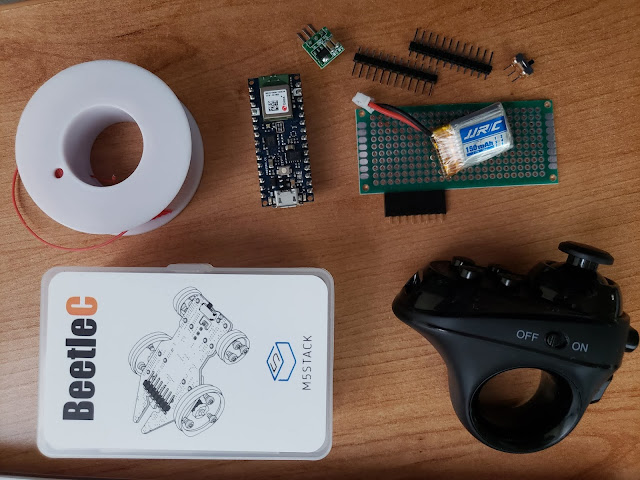
Intro This blog entry doesn't have anything to do with optimization, but due to the interest shown for my Twitter posts about it, I'll make an exception. The M5Stack company has been prolific in creating modules and fun accessories around the ESP32 processor. Something that recently caught my eye is their Beetle-C mini car. It mates with their M5Stick-C mini computer to make a tiny "smart" remote controlled car. Their concept for the car is to control it over WiFi with an app running on an Android phone. I had a different plan. I imagined that I could just wire my own MCU to the 8-pin header on the car and do it My Way tm . I've also been experimenting with connecting BLE HID controls to the Nano 33 BLE , so I figured it would be a fun project to combine the two. Here is the parts list: M5Stack Beetle-C Arduino Nano 33 BLE ACGAM R1 "VR" BLE HID controller DC-DC 5V boost converter 3x7cm tinned perfboard 8-pin female 0.1" header Male 0...

Optimizing access to serial (I2C/SPI) displays

Image
Intro I've been thinking about writing this post for a while. I decided to do it because I've recently been working on my SPI LCD library and have been more engaged with other engineers on working with serial displays. The purpose of this post is to share some thoughts on getting the best performance from serially connected displays. I've randomly reached out to a few people I saw on Twitter having performance issues and thought it would be better to collect my thoughts here to reach a wider audience. The Problem Hobbyists typically buy a serial (I2C/SPI) display for their project, make use of a third party library to drive it and wonder why the performance of their software is disappointing. I believe this is due to the following misconception: "Every pixel takes the same amount of time to draw, right? If I write data to my 240x320 LCD at 40Mhz, I should be able to get 30+ FPS of full screen updates." Explanation Serially connected displays use the same...

How much current do OLED displays use?

Image
Those little OLED displays are everywhere, and there's a good reason. They're inexpensive, easy to program and they look good. I wanted to explore how much current they draw so that I can plan better for battery powered projects. Questions I want answered: How much idle current is drawn when the controller is off versus on (blank display)? What's the minimum current to see text indoors? What's the maximum current when all pixels are on at their brightest? How does display size affect current draw? How does active data writing affect current draw? It's obvious they use more, but how much current do grayscale and color OLEDs use? How practical are OLED displays compared to common LCDs for battery powered projects? Materials: Cheap multimeter (manual scale, assumed accuracy +/-10% at worst) Various OLED displays (72x40, 96x16, 128x32, 64x32, 128x64-0.96", 128x64-1.3") Arduino compatible microcontroller ( Adafruit nRF52840 Feather Express ) ...