Posts

Bits, Bytes and Pixels

Image
Intro I've been thinking about writing this post for a while and some recent work optimizing an e-ink library reminded me to get started. A common theme I see in a lot of the (other people's) code that I optimize is that simple bit/byte/pixel operations are turned into overly complicated code with lots of compares and branches. The authors tend to tie themselves in knots to write working code, but the common theme is that they don't really understand how computers do their work. They approach the topic of bit manipulation as if each bit has a life of its own and is not somehow related to the other bits in the variable. Computers these days are super complicated machines, but fundamental parts of the design haven't changed from the earliest 4-bit digital computer to today's multi-core supercomputers. The part I'm talking about is the concept that all digital data is defined as different sized groups of bits; a bit is just an on (high) or off (low) signal on a s...

Optimizing JPEG decoding

The aim of this blog post is to document my new optimized Arduino/embedded JPEG decoder library . There are already a couple of good Arduino libraries available, so why re-invent the wheel? It's best to take a step back and explain why it's challenging to decode JPEG files on 'small memory' devices, then it will be clearer why I wrote it. Let's say that we want to display a 320x240 image on one of the popular TFT LCD displays. A 320x240x16-bit (RGB565) image requires 153K bytes of storage. For a device like the Arduino Mega2560, it would be impossible to fit the whole image in its 8K of internal RAM. Luckily the way JPEG baseline images are stored, it's not necessary to hold the entire image in memory.  The image is divided into MCUs (minimum coded units) which all derive from a basic 8x8 Discrete Cosine Transform . Each of these blocks can be decoded in sequence and sent to a SPI LCD display individually. SPI LCDs have their own internal frame buffer memory. Th...

A 'Low Memory' GIF decoder

Image
I just released my AnimatedGIF library for Arduino and it contains a lot of optimizations and workarounds to perform well on microcontrollers. I thought it might be useful to document what makes it different from other GIF decoders out there. First a little background on GIF images: GIF (Graphics Interchange Format) Compuserve was an early internet service provider and they created an image format for streaming compressed pictures over a slow and unreliable channel (dial-up internet). Their first format (GIF87) utilized LZW compression for transmitting a single image. LZW compression is a clever way of finding and compressing repeated sequences of symbols and outputting them in a (VLC) variable-length-code stream. The GIF format treats images as a continuous (one dimensional) stream of pixels. By doing it that way, it misses out on taking advantage of horizontal and vertical symmetries. The PNG file format compresses image more effectively not just because Deflate/Inflate compress...

Inside the mind of an optimizer

Image
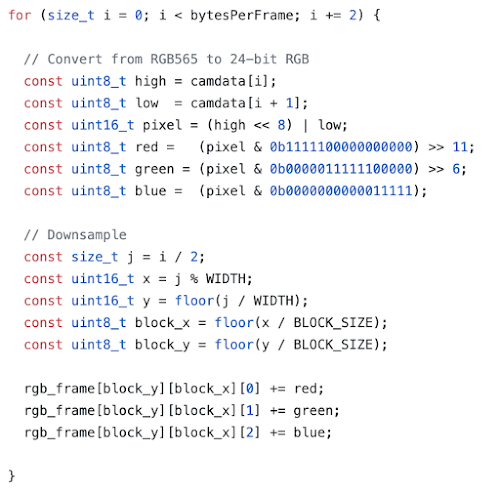
In this post I'm going to walk through my thought process when I examine a piece of code. By explaining each of my changes, hopefully I can reveal some info that will be useful to programmers who don't normally focus on performance. This is the code I'm going to pick apart. It's an image downsample loop from an Arduino sample project that uses machine learning to recognize images from a VGA camera. The requested camera image is QVGA (320x240) resolution and will be downsampled to 10x8 by this loop to make it more manageable for the Arduino Nano 33 BLE to process. Some background bytesPerFrame - holds the value 320x240x2 since each pixel (of type RGB565) occupies 2 bytes.  camdata[] - the uint8_t buffer holding the image rgb_frame[][][] - a 3-dimensional array which will hold the downsampled image WIDTH is a constant containing 320 BLOCK_SIZE is a constant containing 30 (each 30x30 block of pixels from the original image becomes one pixel in rgb_frame[]) What I See The l...

Optimized font rendering on SPI LCDs

Image
The P roblem The open source community has a few large contributors (e.g. Arduino, Google, Adafruit, Microsoft) and their contributions usually set the standard for certain projects and code libraries. I contribute to open source as a way of paying back what I've learned from it. This is not a knock on them to admit that performance is usually not their number one priority, while it usually is mine . Which brings us the reason for this blog post - drawing fonts on inexpensive LCD displays. This has been mostly the exclusive domain of Adafruit's GFX library, but the performance of that code is quite slow, especially on slow MCUs like the Arduino Uno. The Solution Adafruit created a good system of converting TrueType fonts into a simpler bitmap format that makes it easy to draw on low power MCUs. They converted the vector data into an array of small bitmaps with an index to reference the start and size of each bitmap. The performance problem comes from the way characters are dr...

Optimizing Embedded C - The Median Filter

Image
Optimizing code on desktop and mobile CPUs shares many of the same rules as embedded CPUs, but there are some important differences. In this post, I'm going to walk through optimizing an image filter on an ARM Cortex-M4/M7 processor. The specific code in this case comes from my work with the OpenMV project and optimizing their median filter . For those unfamiliar with their work, OpenMV has created a series of ever more powerful embedded CPU boards with integrated cameras for 'smart camera' IoT applications. The value they bring to the market is not only mating powerful embedded CPUs and advanced camera modules, but a rich software ecosystem. It has a large collection of useful native code primitives written in C, accessed through a Python front end. All of it is controlled from a slick IDE that makes experimentation and deployment painless. I started working with OpenMV a few months ago to optimize their time-critical functions. This week I've been working on their i...

My BLE Adventures

Image
On my continuing quest to learn "The IoT", I've explored a long list of sensors, displays, microcontrollers, LEDs and some forms of wireless communication. Recently I've taken more of an interest in Bluetooth Low Energy because of its wide adoption in consumer devices and integrated support in some MCUs. This blog post documents some of the trivia/tricks I've learned along the way. The word 'Adventures' is really a euphemism; the BLE specification is completely documented, yet each companies' software (and API) implementation is unique, full of missing features, incompatibilities and outright bugs. It's been a somewhat frustrating journey to arrive where I have and hopefully this blog post will help you avoid some of the sticking points and dead ends I've hit along the way. Red text indicates a feature limitation, bug or other issue you'll probably find important. First, some terminology: BLE vs. Classic BT The Bluetooth wireless sta...